How to Fix VMware Workstation 7/8/9 Installation Script Errors on Windows Vista or 7 or 8

I have recently faced this Script error while installing VMware Workstation on my Laptop. This is quite annoying that we can’t past this screen even accepting the error with “YES” or “NO”.

VMware Communities recommended to  install it in Silent mode background install, Hopefully that worked for some people, who are lucky maybe if they haven’t saw this awesome method whilst their time…
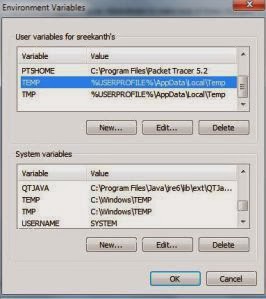
This method involves, just changing your temp file directory temporarily. So a minor changes are needed to install VMware Workstation Successfully on your Machine, bypassing the script errors and any issues.
First off, Go to System properties by right-clicking the computer and selecting the properties option, and then following to click the Advanced System Settings in the Left hand side 

nce You are at this Environment Variables Screen, All you have to do is to Edit the TEMP and TMP FILES Path to C:\Tmp path. Once you do that with the system and user variables, the installation will proceed smoothly. Remember to copy the paths of the original “TEMP” and “TMP” paths to “Notepad” to revert back to original TEMP and TMP paths once Workstation installation has been successful. Do for the both System and User environment variables.
When changed to C:\Tmp file path, the extracting files of Vmware workstation would be done to Tmp file in C, where the script errors that are occuring can be fully resolved with this method. The temp path has issues when reading the index.htm file in extracted Vmware folder. You can name your TEMP and TMP files as you wish, but remember to revert back to original PATHS for TEMP and TMP in environment variables, once your installation is made.

http://chaladi.me/2012/08/01/solving-vmware-workstation-7-8-9-installation-script-errors/

"Connect to" dialog username grayed out for remote shared folder

Archived from groups: microsoft.public.windowsxp.work_remotely (More info?)
Problem
I am trying to connect from one Windows XP Pro system to another within a
workgroup using the \\ComputerName\d$ call in the address bar of Windows
Explorer.

Resolution
This means that anonymous logon is enabled and by default it take only
'Guest' user. You need to edit some settings on the machine you are
connecting to as follows:
1) Start -> Run -> secpol.msc
2) Goto Security settings -> Local Policies --> Security options
3) For the policy 'Network access:Sharing and security model for local
accounts' change the security setting to 'Classic'


Windows failed to start, Status 0xc000000f

Windows failed to start up. A recent hardware or software change might be the cause. To fix the problem:

1. Insert your windows installation disc and restart your computer.
2.choose your language settings and then click next.
3.click "repair your computer."

If you do not have this disc, contact your system administrator or computer manufacturer for assistance.

File: \windows\ststem32\winload.exe

Status: 0xc000000f

Info: The selected entry could not be loaded because the application is missing or corrupt.

How to recover files from RAW flash drive/partition?

What is "RAW" drive partition?

The term RAW disk refers to the accessing of the data on a hard drive disk (HDD) or other disk storage device or media directly at the individual byte level instead of through its file system as is usually done. Users cannot access the files on the RAW disk and if a disk reads as RAW in Windows, possible (but not all) symptoms are:
Invalid media type reading drive.
Abort, Retry, Fail?
File system is displayed as "RAW".
Windows may ask if you want to format the drive, such as warning "disk not formatted. Do you want to format now?" As the follow picture.
File names contain "weird" characters.
"Sector not found" messages.

Recover files from RAW partition

Data Recovery Wizard can recover files from deleted, missing and corrupt partition where file system is severely corrupted or destroyed. Of course, it could recover files from RAW partition or other storage media such as hard drive, floppy disk, zip disk, USB drive or any other storage device whose drive letter is displayed in Windows "My computer".
We can recover files from RAW partition by choosing "Complete Recovery". The other two modes, "Deleted File Recovery" is used to recover deleted files and "Partition Recovery" is used to recover lost files from lost partition. Here are 5 steps for RAW partition recovery:

1.Download a demo version of EaseUS Data Recovery Wizard and install it on your computer. After launching it, select "Complete Recovery" button on the main window of the Data Recovery Wizard.

How to Remove Internet Security virus

Internet Security designed to protect is a computer virus, which pretends to be a legitimate security program and claims that malware has been detected on your computer. If you try to remove these infections, the Internet Security virus will state that you need to buy its full version before being able to do so.
Internet Security trojan targets users browsing Internet websites, and rely on social engineering to deliver its payload.
On infected or hacked websites users are prompted by a pop-up window that has been carefully crafted to resemble a legitimate security warning. These pop-up windows typically alert a user of a computer infection, and then prompt the user to download and install Internet Security to resolve the apparent issue.
Some of the infections may have come from users downloading an infected codec file when they were trying to watch a video online, or users who receive a spam email and open an infected email attachment. Once installed, Internet Security will be drop a random malicious file in a random folder under C:\Documents and Settings\All Users\Application Data\, in XP, or C:\ProgramData, in Windows Vista, Windows 7, and Windows 8.
When Internet Security is installed on a computer, it will be configured to automatically start when you login to Windows. When it starts it will automatically perform a scan of your computer, then Internet Security will falsely report that it is infected with a variety of computer infections. If you try to clean these infections, though, Internet Security will state that you first need to purchase a license of the program before you will be allowed to do so.
Internet Security will display fake security alerts that are designed to think that your data is at risk or that your computer is severely infected.These messages include:
Security Warning
Malicious program has been detected. Click here to protect your computer.
Firewall Warning
Hidden file transfers to remote host has been detected.
has detected a leak of your files through the Internet. We strongly recommend that you block the attack immediately.
In reality, none of the reported issues are real, and are only used to scare you into buying Internet Security and stealing your personal financial information.
As part of its self-defense mechanism, Internet Security virus has disabled the Windows system utilities, including the Windows  Task Manager and Registry Editor, and will block you from running certain programs that could lead to its removal.
This rogue antivirus has also modified your Windows files associations, and now whenever you are trying to open a program, the Internet Security virus will block this operation and display a bogus notification in which will report that the file is infected.
iexplore.exe can not start
File iexplore.exe is infected by W32/Blaster.worm. Please activate Internet Security to protect your computer.
If your computer is infected with Internet Security virus, then you are seeing the following screens:

http://malwaretips.com/blogs/internet-security-virus-removal/

Mac OS X 10.6: Unistalling/Deleting a printer

Mac OS X 10.6: Deleting a printer


To delete a printer:

  1. Choose Apple menu > System Preferences and click Print & Fax.
  2. Select the printer in the list at the left, and click the Delete (-) button.
If you delete the printer that’s set as your default printer, Mac OS X selects another printer as your default. If you want to use a different printer as the default, choose its name from the “Default printer” pop-up menu in Print & Fax preferences.

Vmware 8 setup error 1920. service vmware authorization service (vmauthdservice) failed to start. verify that you have sufficient previlieges to start system services

error 1920. service vmware authorization service (vmauthdservice) failed to start. verify that you have sufficient previlieges to start system services
No solution yet kindly install vmware workstation 7

all my programs open into notepad.


These should help :

When you double-click an .EXE file, the program may not launch, instead it may open in Notepad
(displaying the .exe contents), or may launch in any other application.


to fix it...u may try this..
1. Disable or uninstall ur current Antivirus Software..
2. Go to Control Panel>System and Security>Action Center>Recovery>Open System Restore>click next
3. Select the Date when your PC was running Properly>click next..N click Finish...
4. Ur pc will start restoring...n automatically Restart..
5. done!!!
THANKS..
This will surely work

How to fix error status 0xc000000f in windows boot manager

Causes of error status 0xc000000f in windows boot manager

Crashed operating operating system boot manager, as a result of improper shutdown .

Resolution
Boot the computer with the respective operating system (windows 7) 
Select repair computer
Using command console 
type chkdsk /f /r and enter yes at prompt
Bootrec.exe /fixmbr
Change the the directory to that of the your system (c:) 

How to resolve "the ordinal 459 could not be located in the dynamic link library urlmon.dll"

"the ordinal 459 could not be located in the dynamic link library urlmon.dll"

Problem
Recieveing the message "the ordinal 459 could not be located in the dynamic link library urlmon.dll"  Every program works except internet explorer.  Unable to I access the internet. 
Resolution

That's usually an IE issue - check 
First run malwarebyte to remove any malware and virus
Secondly upgrade your Internet explorer to a new version
Problem fixed

windows 8 this app can't open while user account control is turned off

windows 8 Error "this app can't open while user account control is turned off "


Theory on UAC

User Account Control (UAC) can help prevent unauthorized changes to your computer. UAC notifies you when changes are going to be made to your computer that require administrator-level permission. These types of changes can affect the security of your computer or can affect settings for other people that use the computer. We recommend that you leave UAC on to help make your computer secure.

Firstly, the reason Microsoft has done this is because there is a new security feature in Windows 8 for Metro apps called AppContainer that really restricts what areas of the operating system Metro apps can read and write too. When you really disable UAC in Windows 8, you can’t run any apps from the Windows store! Yes you heard that right!

If you disable UAC in Windows 8, you will not be able to run apps from the Windows Store (Metro apps). Instead, you’ll get a nice dialog saying “This app can’t open. App can’t open while User Account Control is turned off“.

Resolution

To turn UAC on or off


Open User Account Control Settings by clicking the Start button , and then clicking Control Panel. In the search box, type uac, and then click Change User Account Control settings.

Do one of the following:

To turn off UAC, move the slider to the Never notify position, and then click OK.   If you're prompted for an administrator password or confirmation, type the password or provide confirmation. You will need to restart your computer for UAC to be turned off.

To turn on UAC, move the slider to choose when you want to be notified, and then click OK.   If you're prompted for an administrator password or confirmation, type the password or provide confirmation.

How to Unlock Android phone that is locked after too many pattern attempts Samsung Galaxy Apollo 3 GT-i5800

How to Unlock Android phone that is locked after too many pattern attempts Samsung Galaxy Apollo 3 GT-i5800

Workarounds

1. take the battery out of the back
2, put is back in
3. hold the volume button and the menu button (Bottom of the phone) down, keep them held down
4. switch on the phone- keep the volume and menu button held down (and let go of the power button)
5. Let go when you see the blur text asking about what you want to do
6. select the factory reset option using the volume button to go up and down
7. Restart the phone and their you go!!